After a couple hours on the charger, I paired it with my phone (an iPhone 4s running iOS 7). At first I encountered an error when enabling notifications, so I skipped that step. The setup was quick (I had downloaded the Pebble and swim.com apps while waiting for the watch to arrive), and I was soon browsing the Pebble app store. Downloading and playing around with watchfaces is a bit addicting! There are so many to choose from. Then I snagged a few apps, namely swim.com, Morpheuz, and Misfit. The Pebble app is easy to use and makes managing your apps easy as pie. One complaint that comes up about the watch is the 8 app limit - you can only have 8 apps on your watch at one time. This includes watch faces. But in my time with the watch, I don't see myself really needing more apps than that. But to address this issue, the Pebble app gives you a "locker" where you can store apps you have already downloaded, and swapping in and out of the locker takes only a few seconds. All the apps are locally stored on your phone, so there is no lag when swapping as nothing needs to be downloaded.
 |
| The simple interface of the Pebble app |
I switched the included leather band for Pebble's official metal band. Sadly it was too big for my wrist out of the box, so I had to remove a few links. Don't underestimate this process - it is a lot more difficult than I expected and I had to watch a couple of YouTube videos to get it done.
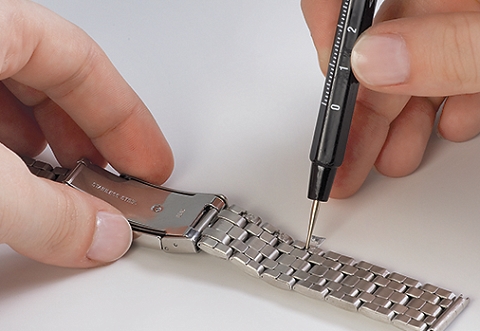 |
| This picture makes the process look easy. It is not. |
Then I strapped the watch on and went to bed, first activating Morpheuz for its sleep tracking and gentle wakeup feature. Sleep tracking is easy - just open the app on the watch and press a button to signal that you are going to bed. I also set an alarm to wake me between 9:20 and 9:45 the next morning. The app is supposed to monitor your sleep cycles and select a wakeup time when you are not in a deep sleep. The alarm is silent, and the watch vibrates intermittently on your wrist. It went off at 9:45 - not sure if I was in a deep sleep still, but the buzzing on my wrist was very effective and would be a nice feature when you don't want to rouse your partner in the morning with a noisy alarm.
The second test was when I went for my first swim with the watch. This was a piece of cake, despite the user reviews I had seen where people had issues getting it to work properly. All I had to do was open the app on the watch, press a button to start the workout, and go. It correctly told me how far I had gone and the time, and was easy to see under the water as I swam. I wasn't quite sure what to do next to get the data from my swim off the watch and onto my phone and the swim.com website. When I got home, I opened the swim.com app on my phone and saw that the data had already synched and was there to see. It showed my the time and length I had swam, and it was accurate, correctly showing that I had been swimming for 23 minutes and done 40 lengths/1000 yards. There was other data, achievements, and even a social network element showing other swimmers in the area! I love it. I didn't shower with the watch as hot water is not supposed to be a good idea (it can mess with the adhesives and waterproof seals inside), but I did rinse off the chlorinated water at home.
The next day I got around to figuring out why my notifications were not working. All it took was toggling one setting in the menus, and text and call notifications started showing up on the watch. I hadn't seen the genius in wrist notifications before, but in just a couple of days, it has saved me from missing texts from my family, most critically in the grocery store when I was reminded to pick up the kitchen trash bags we needed! What a world we live in!
 |
| Don't forget trash bags dad! |
So far I am very pleased with my purchase. The swimming features were all I wanted, but the notifications are turning out to be another killer app for me.

No comments:
Post a Comment