So the Kevin Pacey app I have been using on my Pebble watch for swimming started to report that it had expired. Try as I might (factory resets, redownloading the app, power cycling, altering the date), I could not get it to work. Through trial and error, I stumbled upon a way to get it to work, although you can't use the rest of the Pebble functions anymore.
1) Factory reset the watch
2) Pair with your phone
3) Load the Pacey app
4) Forget the Pebble bluetooth connection on the phone
5) Let the Pebble battery go flat
6) Charge the Pebble
7) Do not connect the watch with bluetooth. The date/time will be wrong
8) Use Kevin Pacey app
For me, using the watch for swimming was my main reason for getting it. So despite the loss of all other functionality, at least I can use it for swimming again. I found that the bluetooth connection was pretty failure prone, and in general, the watch needed quite a bit of babysitting to work as promised. I had to re-pair the Pebble Steel frequently, a problem that even cheap bluetooth speakers do not have with my phone.
Monday, December 14, 2015

Thursday, November 12, 2015
Shampoo solution
I got some of the Paul Mitchell Three shampoo, and it works great. The bottle says it is safe to use every day except for color treated hair. That exception makes me think I'd still be wise to limit how much I use it, and so far I have used it only directly after a swim.
When I bought the Three, the stylist suggested pairing it with the Paul Mitchell Super Strong Daily Conditioner. It has a clean soapy smell which is fine. I prefer the mint one I use, but the smell does not stick around, and the conditioner does a good job.
My hair no longer is like straw and doesn't smell of chlorine. I can still smell chlorine on my skin even after a shower. I did a brief search for possible soaps to use and found none. One page I found pointed out that an anti-oxidant was needed to break the bond with chlorine. The only soap I found that fit the bill was a cranberry scented glycerine soap made by Dial. I am kind of doubtful about the cranberry aspect, as I would imagine that it would be pretty smelly. Another site I came across suggested adding vitamin C crystals to water and spraying it on would do the trick.
http://drdebmckay.com/vitamin-c-for-chlorine-removal/
Seems odd, but I may take a look at the store for crystals and give it a try.
When I bought the Three, the stylist suggested pairing it with the Paul Mitchell Super Strong Daily Conditioner. It has a clean soapy smell which is fine. I prefer the mint one I use, but the smell does not stick around, and the conditioner does a good job.
My hair no longer is like straw and doesn't smell of chlorine. I can still smell chlorine on my skin even after a shower. I did a brief search for possible soaps to use and found none. One page I found pointed out that an anti-oxidant was needed to break the bond with chlorine. The only soap I found that fit the bill was a cranberry scented glycerine soap made by Dial. I am kind of doubtful about the cranberry aspect, as I would imagine that it would be pretty smelly. Another site I came across suggested adding vitamin C crystals to water and spraying it on would do the trick.
http://drdebmckay.com/vitamin-c-for-chlorine-removal/
Seems odd, but I may take a look at the store for crystals and give it a try.
Tuesday, October 27, 2015
Hair care
Back in high school, my hair got so damaged from swimming that I could sculpt it into a mohawk with water alone - no gel or mousse needed. And I didn't wear it particularly short.
It's not that bad now, but it is definitely taking a toll. You can still get UltraSwim, at least I found some online, and I remember that working well for me in those days. But surely there are more and better options now than there were in the late 80s.
So I started looking online. I didn't find a VAST array of products tailor made for swimming, but there are a handful besides UltraSwim. I also found message board posts asking what shampoos and conditioners are the best for dealing with the effects of chlorinated pools. Some responders suggested products made for swimmers, while others reported good luck with other types of shampoo and conditioners not made with the pool in mind. In fact, a lot of reviews of products specifically for swimming said that they were no better than a good regular shampoo.
Naturally I started making notes of these suggestions and looking them up on Amazon to read user reviews. It was at that point that I noticed my shampoo decision was reaching OCD levels of research, so why not put it here.
Here is what I am starting with at home.
When my old shampoo ran out recently, my wife got me some of this stuff for thin hair. She is not a fan of shampoos with a lot of bad chemicals. I find the name both humorous and confusing. Instead of saying "for thin hair," I suppose the name means what you want your hair to be. It still sounds like a porno name though.
I really like the smell of this one, so I bought it even though I didn't need shampoo at the time. I'll probably pick up the matching conditioner at some point too.
It's not that bad now, but it is definitely taking a toll. You can still get UltraSwim, at least I found some online, and I remember that working well for me in those days. But surely there are more and better options now than there were in the late 80s.
So I started looking online. I didn't find a VAST array of products tailor made for swimming, but there are a handful besides UltraSwim. I also found message board posts asking what shampoos and conditioners are the best for dealing with the effects of chlorinated pools. Some responders suggested products made for swimmers, while others reported good luck with other types of shampoo and conditioners not made with the pool in mind. In fact, a lot of reviews of products specifically for swimming said that they were no better than a good regular shampoo.
Naturally I started making notes of these suggestions and looking them up on Amazon to read user reviews. It was at that point that I noticed my shampoo decision was reaching OCD levels of research, so why not put it here.
Here is what I am starting with at home.
 |
| John Allan's Thick shampoo (giggedy) |
 |
| Teatree Mint shampoo |
 |
| Rusk Calm conditioner |
And finally I have some of my outgoing conditioner. It and the Calm shampoo have worked fine for me for years, but they are not up to the task of swimming four or more times a week. Plus I found that their quality has declined lately, with the shampoo in particular getting more watery.
So here is a short list of products I have compiled for consideration.
I might start with the Paul Mitchell Shampoo. That one is a clarifying shampoo that promotes its ability to remove chlorine. I would probably only use this shampoo right after the pool, if that often. Whatever ingredients are in there to remove chlorine are probably strong and best used in moderation. Some people online had good success using shampoo like this once a week, and continuing to use regular shampoo the rest of the week.
I hope using clarifying shampoo once a week works out so I can keep using my thick and minty shampoos the rest of the time. I'll need to figure out a good conditioner though. To the user reviews!
So here is a short list of products I have compiled for consideration.
- Paul Mitchell Three Shampoo
- Aveeno Nourish + Moisturize Conditioner
- Reflect Sports H2O Swim Conditioner
- Nexxus Humectress Ultimate Moisturizing Conditioner
- UltraSwim Shampoo/Conditioner
I might start with the Paul Mitchell Shampoo. That one is a clarifying shampoo that promotes its ability to remove chlorine. I would probably only use this shampoo right after the pool, if that often. Whatever ingredients are in there to remove chlorine are probably strong and best used in moderation. Some people online had good success using shampoo like this once a week, and continuing to use regular shampoo the rest of the week.
I hope using clarifying shampoo once a week works out so I can keep using my thick and minty shampoos the rest of the time. I'll need to figure out a good conditioner though. To the user reviews!
Friday, October 9, 2015
Punny swimming app
Still no luck getting the Swim.com app to work on my Pebble. I have done 6 swims with it, and out of that, only one functioned as promised. I started out optimistic since it worked the first time, but all five of my subsequent attempts to use it failed. The app was never again able to upload a workout, and only one other time did it track all of my laps (although that time it credited me with 3 laps I did not do).
So I am abandoning the swim.com app for now. The online tracking would have been nice, but honestly it was a bit of overkill for a non-competitive swimmer.
Next up - SwimIO's swimming app "Kevin Pacey." This app does not use accelerometers to figure out your laps, instead you enter a pace speed per lap. So, for example, after telling it that my pool is 25 yards, I enter 40 lengths for distance, and 30 seconds per length as the pace I want to swim at. Then the watch displays what lap you are on and vibrates when you should be at the wall turning. So it is all about the pace at which you swim, hence the name. I first thought that perhaps Kevin Pacey was a well known swim coach or something, but instead it is a play on Kevin Spacey.

Anyway, after using the app twice now, I can say that it does the job. 30 seconds for 25 yards was a little ambitious for me, so I upped it to 35 seconds which worked out better. You can also press a button to pause the pace if you need a rest. In the image above, you can see that the swimmer is about 2/3 through length 1 - the screen goes from black to white as you swim).
SwimIO is supposedly also working on a more robust offering called Swim Recorder, but I have not seen any recent updates on that project. But for now I am happy with using Kevin Pacey. It does not do any fancy tracking outside the app, but it is better than having to actually press a button on the watch every lap, and so far it seems pretty reliable.
Now that I think of it, Kevin Spacey does know a thing or two about exercise. Not only did he use a rowing machine on House of Cards, he also enjoyed a good workout in American Beauty. :)

So I am abandoning the swim.com app for now. The online tracking would have been nice, but honestly it was a bit of overkill for a non-competitive swimmer.
Next up - SwimIO's swimming app "Kevin Pacey." This app does not use accelerometers to figure out your laps, instead you enter a pace speed per lap. So, for example, after telling it that my pool is 25 yards, I enter 40 lengths for distance, and 30 seconds per length as the pace I want to swim at. Then the watch displays what lap you are on and vibrates when you should be at the wall turning. So it is all about the pace at which you swim, hence the name. I first thought that perhaps Kevin Pacey was a well known swim coach or something, but instead it is a play on Kevin Spacey.
Anyway, after using the app twice now, I can say that it does the job. 30 seconds for 25 yards was a little ambitious for me, so I upped it to 35 seconds which worked out better. You can also press a button to pause the pace if you need a rest. In the image above, you can see that the swimmer is about 2/3 through length 1 - the screen goes from black to white as you swim).
SwimIO is supposedly also working on a more robust offering called Swim Recorder, but I have not seen any recent updates on that project. But for now I am happy with using Kevin Pacey. It does not do any fancy tracking outside the app, but it is better than having to actually press a button on the watch every lap, and so far it seems pretty reliable.
Now that I think of it, Kevin Spacey does know a thing or two about exercise. Not only did he use a rowing machine on House of Cards, he also enjoyed a good workout in American Beauty. :)
Thursday, October 1, 2015
Pebble still didn't track/synch
Tried again today, this time with the phone's bluetooth off and both the Pebble and Swim.com apps not running on the phone. Fired up the swim.com app on the watch, and got only at far as 150 yards this time before it stopped tracking. I finished up, stopped the workout with the Pebble's left button, and turned on bluetooth on the phone, followed by the Pebble and Swim.com apps. Nothing.
I found this help topic on Swim.com's site that has the following detail:
I will try this next time, but I really, I am less concerned about not being able to synch than I am about the watch not tracking the laps properly.
If that doesn't help, I will try Misfit or one of the other couple swimming related apps I saw in the Pebble store.
More notes
Swim.com's twitter: https://twitter.com/swimdotcom
Youtube video where a tester from swim.com details some troubleshooting methods and workarounds: https://www.youtube.com/watch?v=oqXNxaSr9Vg&feature=youtu.be
Swim.com's knowledge base topics: http://support.swim.com/hc/en-us/categories/200148269-Knowledge-Base
I found this help topic on Swim.com's site that has the following detail:
On the Pebble, it's important that after your workout you hit
the center button on your Pebble to enter rest mode/end interval before pushing
the left button on your Pebble to get a completed workout confirmation. This is
especially important for Pebble users who do not use the interval function when
swimming because the Pebble will record a distance of 0 if your first and only
interval is not ended in rest mode.
I will try this next time, but I really, I am less concerned about not being able to synch than I am about the watch not tracking the laps properly.
If that doesn't help, I will try Misfit or one of the other couple swimming related apps I saw in the Pebble store.
More notes
Swim.com's twitter: https://twitter.com/swimdotcom
Youtube video where a tester from swim.com details some troubleshooting methods and workarounds: https://www.youtube.com/watch?v=oqXNxaSr9Vg&feature=youtu.be
Swim.com's knowledge base topics: http://support.swim.com/hc/en-us/categories/200148269-Knowledge-Base
Wednesday, September 30, 2015
Issues with Pebble's swim tracking
I guess I jinxed it. After a flawless first session tracking my swim with the Pebble, the next two workouts did not get tracked or synched. Both times, the watch got stuck at 450yards. The first time I tried toggling a rest, which managed to get the app to track another 100 yards, but then it stopped again. I tried more buttons and accidentally exited, so it did not have a chance to upload. Same story today, except I didn't touch anything when it got stuck and ended the workout properly. It only tracked 450 yards, and didn't upload either.
No clue why the Pebble stopped after 450 yards. I had the Swim.com companion app open on my phone both times (not sure about the first workout), so I am wondering if Pebble was trying to bluetooth to my phone that was in my bag poolside. Next time I will try with the phone's bluetooth off and turn it back on once the workout is over.
Still optimistic, I just wish it wasn't so fiddly to get it to work.
No clue why the Pebble stopped after 450 yards. I had the Swim.com companion app open on my phone both times (not sure about the first workout), so I am wondering if Pebble was trying to bluetooth to my phone that was in my bag poolside. Next time I will try with the phone's bluetooth off and turn it back on once the workout is over.
Still optimistic, I just wish it wasn't so fiddly to get it to work.
Monday, September 28, 2015
Pebble Steel: First impressions
I got the watch on Friday, and wore it all weekend, even while sleeping! I love it - it is a smartwatch that manages to be retro despite the newness of the smartwatch category.
After a couple hours on the charger, I paired it with my phone (an iPhone 4s running iOS 7). At first I encountered an error when enabling notifications, so I skipped that step. The setup was quick (I had downloaded the Pebble and swim.com apps while waiting for the watch to arrive), and I was soon browsing the Pebble app store. Downloading and playing around with watchfaces is a bit addicting! There are so many to choose from. Then I snagged a few apps, namely swim.com, Morpheuz, and Misfit. The Pebble app is easy to use and makes managing your apps easy as pie. One complaint that comes up about the watch is the 8 app limit - you can only have 8 apps on your watch at one time. This includes watch faces. But in my time with the watch, I don't see myself really needing more apps than that. But to address this issue, the Pebble app gives you a "locker" where you can store apps you have already downloaded, and swapping in and out of the locker takes only a few seconds. All the apps are locally stored on your phone, so there is no lag when swapping as nothing needs to be downloaded.
I switched the included leather band for Pebble's official metal band. Sadly it was too big for my wrist out of the box, so I had to remove a few links. Don't underestimate this process - it is a lot more difficult than I expected and I had to watch a couple of YouTube videos to get it done.
Then I strapped the watch on and went to bed, first activating Morpheuz for its sleep tracking and gentle wakeup feature. Sleep tracking is easy - just open the app on the watch and press a button to signal that you are going to bed. I also set an alarm to wake me between 9:20 and 9:45 the next morning. The app is supposed to monitor your sleep cycles and select a wakeup time when you are not in a deep sleep. The alarm is silent, and the watch vibrates intermittently on your wrist. It went off at 9:45 - not sure if I was in a deep sleep still, but the buzzing on my wrist was very effective and would be a nice feature when you don't want to rouse your partner in the morning with a noisy alarm.
The second test was when I went for my first swim with the watch. This was a piece of cake, despite the user reviews I had seen where people had issues getting it to work properly. All I had to do was open the app on the watch, press a button to start the workout, and go. It correctly told me how far I had gone and the time, and was easy to see under the water as I swam. I wasn't quite sure what to do next to get the data from my swim off the watch and onto my phone and the swim.com website. When I got home, I opened the swim.com app on my phone and saw that the data had already synched and was there to see. It showed my the time and length I had swam, and it was accurate, correctly showing that I had been swimming for 23 minutes and done 40 lengths/1000 yards. There was other data, achievements, and even a social network element showing other swimmers in the area! I love it. I didn't shower with the watch as hot water is not supposed to be a good idea (it can mess with the adhesives and waterproof seals inside), but I did rinse off the chlorinated water at home.
The next day I got around to figuring out why my notifications were not working. All it took was toggling one setting in the menus, and text and call notifications started showing up on the watch. I hadn't seen the genius in wrist notifications before, but in just a couple of days, it has saved me from missing texts from my family, most critically in the grocery store when I was reminded to pick up the kitchen trash bags we needed! What a world we live in!
So far I am very pleased with my purchase. The swimming features were all I wanted, but the notifications are turning out to be another killer app for me.
After a couple hours on the charger, I paired it with my phone (an iPhone 4s running iOS 7). At first I encountered an error when enabling notifications, so I skipped that step. The setup was quick (I had downloaded the Pebble and swim.com apps while waiting for the watch to arrive), and I was soon browsing the Pebble app store. Downloading and playing around with watchfaces is a bit addicting! There are so many to choose from. Then I snagged a few apps, namely swim.com, Morpheuz, and Misfit. The Pebble app is easy to use and makes managing your apps easy as pie. One complaint that comes up about the watch is the 8 app limit - you can only have 8 apps on your watch at one time. This includes watch faces. But in my time with the watch, I don't see myself really needing more apps than that. But to address this issue, the Pebble app gives you a "locker" where you can store apps you have already downloaded, and swapping in and out of the locker takes only a few seconds. All the apps are locally stored on your phone, so there is no lag when swapping as nothing needs to be downloaded.
 |
| The simple interface of the Pebble app |
I switched the included leather band for Pebble's official metal band. Sadly it was too big for my wrist out of the box, so I had to remove a few links. Don't underestimate this process - it is a lot more difficult than I expected and I had to watch a couple of YouTube videos to get it done.
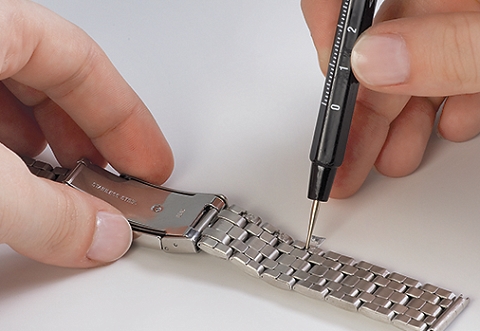 |
| This picture makes the process look easy. It is not. |
Then I strapped the watch on and went to bed, first activating Morpheuz for its sleep tracking and gentle wakeup feature. Sleep tracking is easy - just open the app on the watch and press a button to signal that you are going to bed. I also set an alarm to wake me between 9:20 and 9:45 the next morning. The app is supposed to monitor your sleep cycles and select a wakeup time when you are not in a deep sleep. The alarm is silent, and the watch vibrates intermittently on your wrist. It went off at 9:45 - not sure if I was in a deep sleep still, but the buzzing on my wrist was very effective and would be a nice feature when you don't want to rouse your partner in the morning with a noisy alarm.
The second test was when I went for my first swim with the watch. This was a piece of cake, despite the user reviews I had seen where people had issues getting it to work properly. All I had to do was open the app on the watch, press a button to start the workout, and go. It correctly told me how far I had gone and the time, and was easy to see under the water as I swam. I wasn't quite sure what to do next to get the data from my swim off the watch and onto my phone and the swim.com website. When I got home, I opened the swim.com app on my phone and saw that the data had already synched and was there to see. It showed my the time and length I had swam, and it was accurate, correctly showing that I had been swimming for 23 minutes and done 40 lengths/1000 yards. There was other data, achievements, and even a social network element showing other swimmers in the area! I love it. I didn't shower with the watch as hot water is not supposed to be a good idea (it can mess with the adhesives and waterproof seals inside), but I did rinse off the chlorinated water at home.
The next day I got around to figuring out why my notifications were not working. All it took was toggling one setting in the menus, and text and call notifications started showing up on the watch. I hadn't seen the genius in wrist notifications before, but in just a couple of days, it has saved me from missing texts from my family, most critically in the grocery store when I was reminded to pick up the kitchen trash bags we needed! What a world we live in!
 |
| Don't forget trash bags dad! |
So far I am very pleased with my purchase. The swimming features were all I wanted, but the notifications are turning out to be another killer app for me.
Subscribe to:
Comments (Atom)